

greetform vs Google Forms: survey tool or newsletter post-subscribe layer?
Google Forms is a fast, general survey tool. greetform is a newsletter-specific post-subscribe survey, offer, and lead system. A practical comparison for newsletter operators.
 TJ LarkinBuilds greetform at 8th replayAugust 26, 2026 · 6 min read

- Google Forms supports branching only through "go to section based on answer," and only for Multiple Choice and Dropdown question types.
- Google Forms has no documented newsletter, subscriber-management, or native ESP integration. The standard path is Forms to Sheets, then a separate automation layer.
- greetform is built specifically for the newsletter post-subscribe moment: conditional questions, an offer wall, lead capture, and ESP field sync in one flow.
- Google Forms ends at a spreadsheet or response summary. greetform is built to act on an answer immediately: change the next question, show a relevant offer, or route a lead.
Pick Google Forms for a lightweight, one-off survey or poll where a spreadsheet of answers is the finish line. Pick greetform for the newsletter post-subscribe moment, where an answer needs to change what a reader sees next, not just get recorded for later review.
Google Forms is built to collect answers. greetform is built to act on them.
Google Forms describes itself as a tool to create surveys, quizzes, and forms, then analyze responses in real time or send them to a spreadsheet. That is the right job for a lot of use cases. It is not built around continuing a newsletter subscription while the reader is still paying attention.
What Google Forms does well
- Fast to build, free, and familiar to almost every reader.
- Branching through "go to section based on answer," limited to Multiple Choice and Dropdown question types.
- Responses viewable as a Summary, an Individual view, or synced live to a Google Sheet, with CSV export.
- Basic theme customization: color, a header image, and a limited set of built-in fonts.
Where Google Forms stops for a newsletter
Google Forms has no documented newsletter or subscriber-management feature. Collected emails have to move somewhere else, typically Sheets, then a third-party automation layer, before they can reach an ESP or CRM. Branching is also limited to two question types, which restricts how far a newsletter operator can take conditional logic before hitting the tool's ceiling.
What greetform is built for
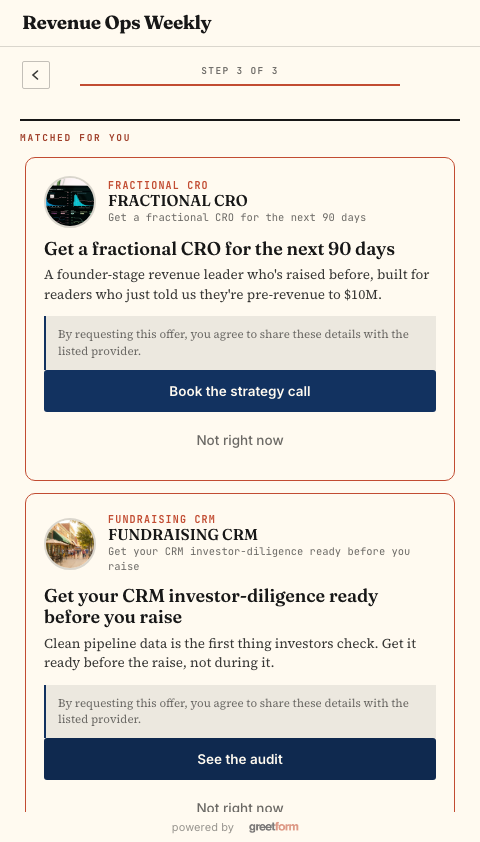
greetform sits after the newsletter subscription already succeeded, asks a short conditional survey built for newsletter segmentation, and immediately uses the answer: a different next question, a relevant offer, a routed lead, or a synced ESP field.
- 01Ask
A short, optional set of questions built for newsletter segmentation, not generic survey logic.
- 02Branch
The answer decides the next question or the eligible offer, without the two-question-type ceiling of a general survey tool.
- 03Route
A relevant offer, membership, or advertiser lead page appears, tied to what the subscriber actually said.
- 04Sync
The fields that matter reach the newsletter's existing ESP, instead of sitting in a spreadsheet.
The practical decision table
| Your main job | Better starting point | Why |
|---|---|---|
| A quick internal survey or reader poll | Google Forms | Free, fast, and familiar, with no setup beyond the form itself. |
| Newsletter post-subscribe survey and offer routing | greetform | Built specifically for the newsletter moment, with branching that isn't limited to two question types. |
| Branching logic across many question types | greetform | Not restricted to Multiple Choice and Dropdown like Google Forms' section-based branching. |
| Getting an answer into your ESP automatically | greetform | Syncs relevant fields directly, without a separate Sheets-to-ESP automation step. |
| Annual reader research alongside a newsletter | Both | Google Forms for broad one-off research, greetform for the ongoing post-subscribe flow. |
Scenario: a city newsletter separates research from activation
A city arts newsletter might run an annual Google Forms survey about venues and coverage priorities, a good fit since the goal is reviewing responses later. After a new subscribe, the same publisher can use greetform for a shorter continuation: ask which neighborhood matters, then route the reader toward a matching guide, membership, or local advertiser lead, while attention is still high.
What this guide checked
- Google Forms overview
Google's own description of Forms as a survey, quiz, and form tool with real-time response analysis.
- Google Forms: go to section based on answer
Confirms branching is limited to Multiple Choice and Dropdown question types.
- Google Forms: view and organize responses
Confirms Summary/Individual response views and the Sheets-linking workflow.
- greetform example library
Current greetform use-case examples and product paths.
Questions people ask
Can Google Forms branch on more than two question types?
Can Google Forms send data to my newsletter platform automatically?
Should I stop using Google Forms if I add greetform?
TJ Larkin builds software for local media at 8th replay, the company behind greetform, larkfeed and lightbreak. He and his team run more than 20 local newsletters, and greetform started as the form they built for their own readers.